LeadGen Data | Smartlead | Automation
Automation
Lead Gen
API
JSON
Sales Analytics
Make.com

Build Time
~5 hours

Category
AI Automation
Automation Flow
Project Overview
A data automation workflow using Make.com that integrates Smartlead with Google Sheets.
This system pulls real-time campaign data and logs it into a structured spreadsheet every 15 minutes for accurate performance monitoring.
The Problem
The client needed a hands-free way to track Smartlead campaign performance across multiple days without manually exporting metrics. Manual tracking caused delays in decision-making and reporting inconsistencies.
The Solution
A Make.com automation that integrates:
1
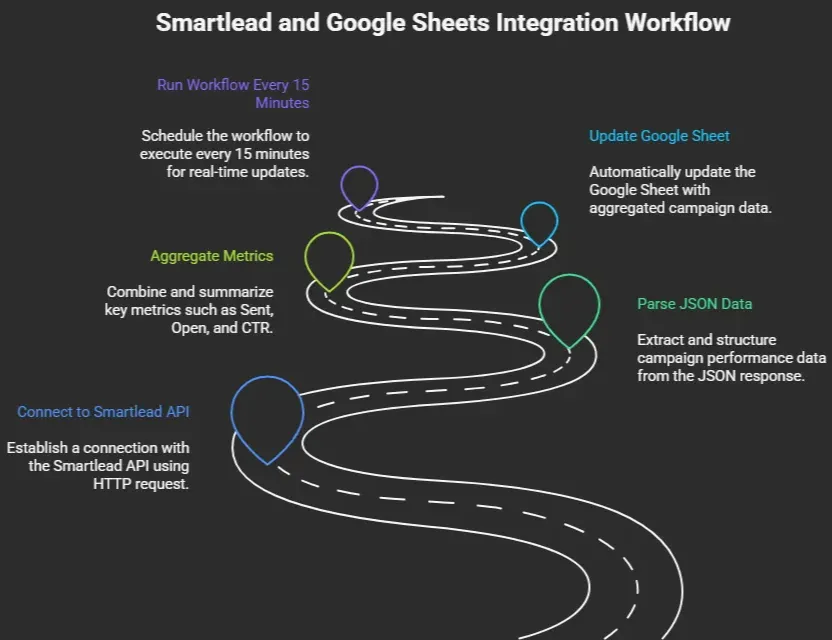
Connects to Smartlead via an HTTP request
2
Parses the returned JSON with campaign performance data
3
Aggregates key metrics such as Sent, Open, CTR, Unsubscribed, etc.
4
Automatically updates a Google Sheet with columns for:
• Name
• Date
• Time
• Day
• People Reached
• Sent
• Open
• Clicks
• CTR
• Unsubscribed
• Bounced/Blocked
The workflow is set to run every 15 minutes.
How It Works
1
Step 1
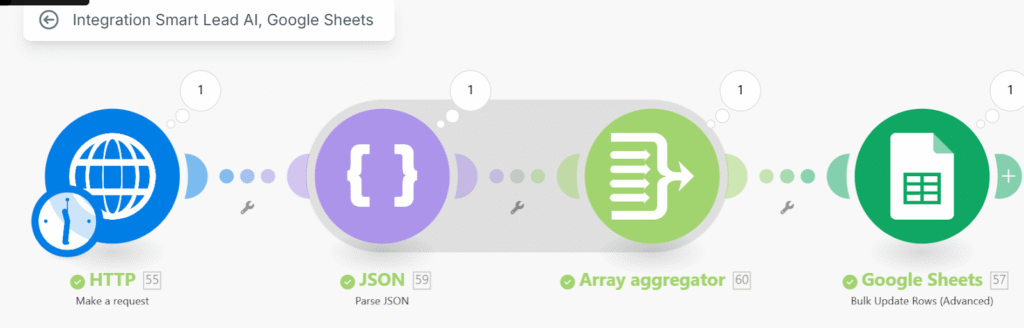
The workflow connects to Smartlead via an HTTP request.
2
Step 2
Parses the returned JSON with campaign performance data.
3
Step 3
Aggregates necessary metrics.
4
Step 4
Updates a Google Sheet automatically with structured campaign statistics.
This runs every 15 minutes to ensure the data remains accurate and up to date.
The Results

Saved 2–3 hours per week in manual reporting
Improved visibility of campaign performance
Enabled the team to make faster decisions using near real-time data
Tools Used

Make.com

Smartlead API

Google sheets

HTTP Module

JSON Parser

Array Aggregator
Key Wins
Saved 2–3 hours per week in manual reporting
Improved visibility of campaign performance
Enabled the team to make faster decisions using near real-time data
Workflow