LeadGen Data | Klaviyo | Automation
Automation
Lead Gen
Klaviyo
API
JSON
Sales Analytics
Make.com

Build Time
~5 hours

Category
AI Automation
Automation Flow
Project Overview
This automation eliminates the burden of manually keeping campaign metrics up to date by syncing Klaviyo analytics to Google Sheets every 15 minutes, completely hands-free.
It connects to Klaviyo via API, extracts campaign data, and updates a Google Sheet in real-time.
The Problem
The marketing team struggled with manually tracking campaign performance, which required logging into Klaviyo and exporting CSVs daily.This manual process was inefficient, repetitive, and prone to human error.
The Solution
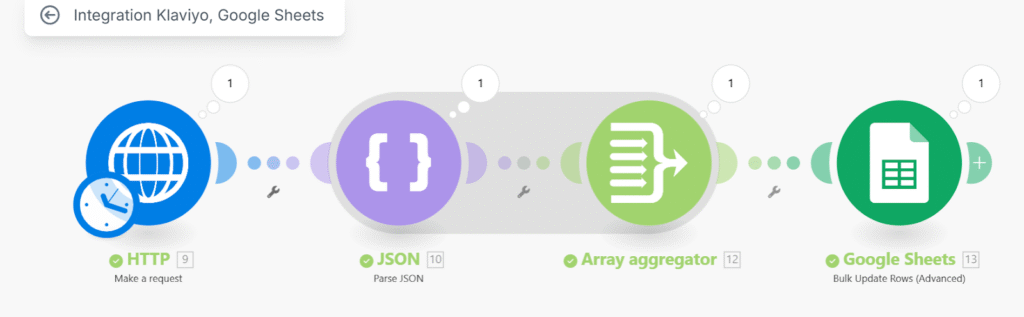
An automation system was designed using Make.com that connects to Klaviyo via API, extracts campaign data, and updates a Google Sheet in real-time.
This workflow runs every 15 minutes to ensure live data synchronization.
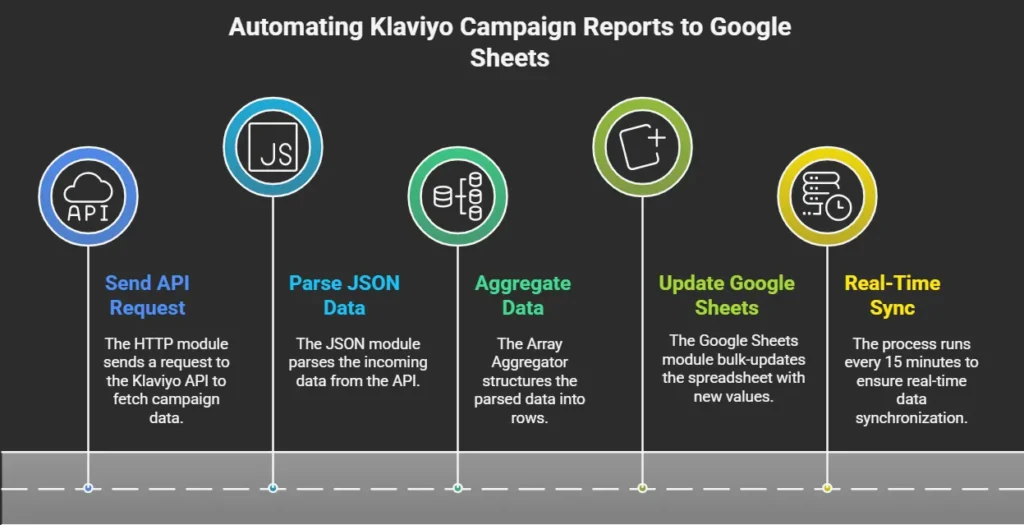
How It Works
1
Send API Request
The HTTP module sends a request to the Klaviyo API to fetch campaign data.
2
Parse JSON Data
The JSON module parses the incoming data.
3
Aggregate Data
The Array Aggregator structures the parsed data into rows.
4
Update Google Sheets
The Google Sheets module bulk-updates the spreadsheet with new values.
5
Real-Time Sync
This process runs every 15 minutes to ensure real-time data sync.
Google Sheet Columns
Campaign Name
Date
Day
Status
Number of People Reached
Delivered
Open
Clicks
Click Through Rate (CTR)
Unsubscribed
Bounced/Blocked
The Results

The automation saved 2–3 hours per week in manual reporting, enabled real-time tracking of campaign metrics, reduced data entry errors to zero, and gave stakeholders instant access to performance insights.
Tools Used

Make.com
Google sheets

OpenAI (ChatGPT)
Klaviyo (API)

JSON Parser

Array Aggregator

HTTP Module
Key Wins
Saved 3 hours per week in manual reporting
Enabled real-time tracking of campaign metrics
Reduced data entry errors to zero
Gave stakeholders instant access to performance insights
Workflow