Text to video Generation Automation
Automation
Text to video Generation
AI Content Creation

Build Time
~7 hours

Category
AI Automation
Automation Flow
Project Overview
An automation designed to create avatar videos by reading a title from Google Sheets, generating a story using Google Gemini AI, creating an avatar video with Heygen, and logging all results in Google Sheets.
The Problem
The challenges faced during automation included:
AI Limits: Occasional errors or quota limits with Gemini AI
Google Sheets Updates: Avoiding row mismatches and duplicate updates
Heygen Processing: Managing long generation times and text limits, and occasionally generating videos without audio
Error Handling: Ensuring failures didn’t block the entire workflow
API Authentication: Keeping connections for Sheets, Gemini, and Heygen active and secure
The Solution
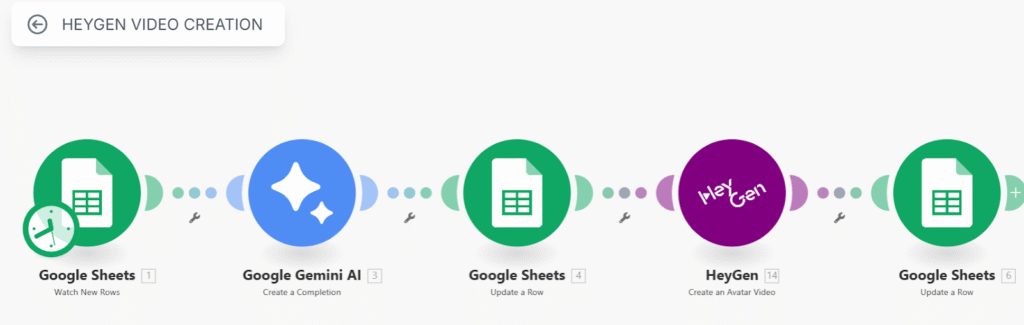
A Make.com automation that integrates:
Google Sheets to watch for new rows with a title, which serves as the prompt for story generation. The sheet has three columns — TITLE (prompt or topic for story generation), RESULT (story text generated by Gemini AI), and HEYGENID (ID of the video generated by Heygen).
Google Gemini AI to generate a detailed story based on the title input.
The generated story is then updated in Google Sheets in the RESULT column.
Heygen’s “Create an Avatar Video” module receives the story text from the RESULT column to generate a video.
The video ID returned by Heygen is updated in Google Sheets in the HEYGENID column, linking the title, story, and video ID.
How It Works
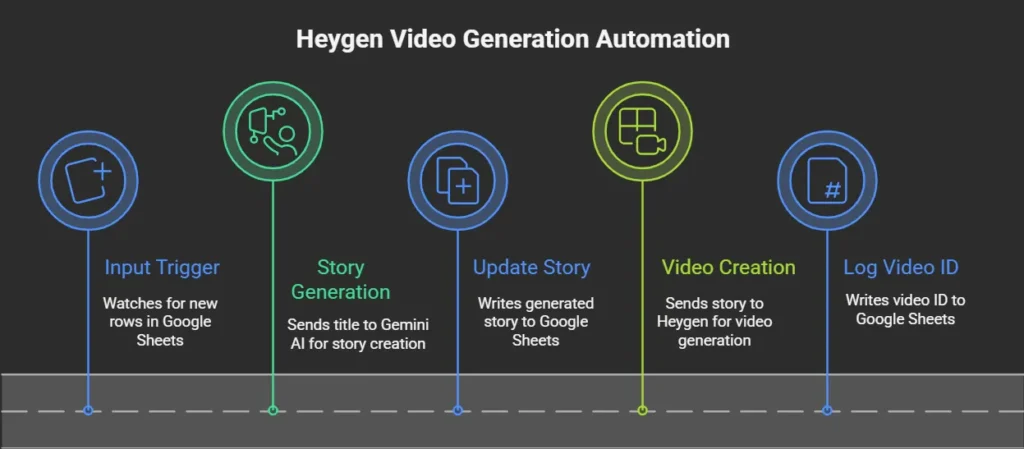
1
Input Trigger
Watches for new rows in Google Sheets that contain a title.
2
Story Generation
The title is sent as a prompt to Gemini AI, which returns a detailed story.
3
Update Story:
The generated story is written to the RESULT column of the same row in Google Sheets.
4
Video Creation:
The story text is sent to Heygen’s “Create an Avatar Video” module, which generates a video using the script.
5
Log Video ID:
The video ID returned by Heygen is written to the HEYGENID column in the same row.
The automation runs every 15 minutes or on demand. Each cycle checks for new titles, generates stories, creates corresponding videos, and logs results in Google Sheets.
Key Wins

Fully automated content creation pipeline
Eliminated manual copy-paste work
Easy tracking of prompts, stories, and video IDs in one sheet
Workflow